📌 기본 정보
- 주차/주제: 8주차 - 예외 처리와 데이터 검증
📚 학습 내용 요약
Spring Boot의 기본 예외 처리 방식 조사하기
public Article findById(long id) {
        return blogRepository.findById(id)
                .orElseThrow(() -> new IllegalArgumentException("not found : " + id));
    }
id를 입력받아, 특정 블로그 글을 찾은 다음, IllegalArgumentException 예외로 → not found${id} 에러메시지 보냄
{
"timestamp": 2023-04-16T07:28:34. 039+00: 00", # 예외 발생 시간
"status": 500, # HTTP 상태 코드
"error": "Internal Server Error" , # 예외 유형
"path": "/api/articles/123" # 예외가 발생한 요청 경로
}
예외 발생
- 컨트롤러나 서비스 레이어에서 예외(런타임 예외, 검증 실패 등) 발생
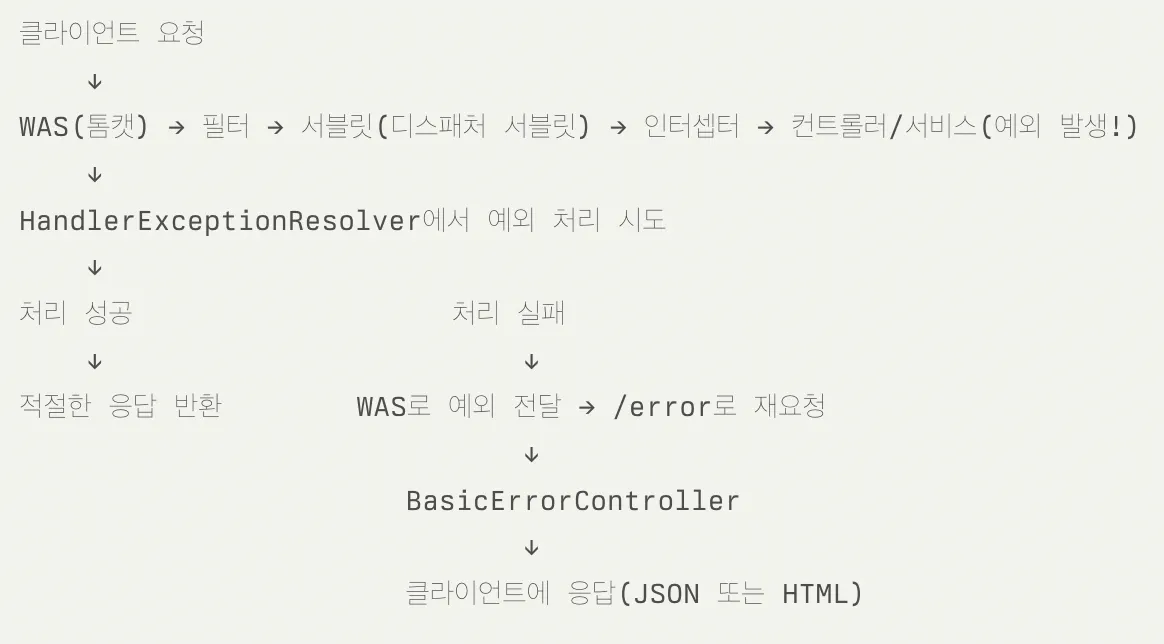
HandlerExceptionResolver 체인
- 예외를 처리하는 인터페이스
- ExceptionHandlerExceptionResolver (우선순위: 높음)
- @ExceptionHandler 어노테이션이 달린 메서드를 찾아 실행
- @ControllerAdvice 클래스 처리
- ResponseStatusExceptionResolver (우선순위: 중간)
- @ResponseStatus 어노테이션이나 ResponseStatusException을 처리
- DefaultHandlerExceptionResolver (우선순위: 낮음)
- Spring MVC 내부에서 발생하는 예외를 적절한 HTTP 상태 코드로 변환
- 예외 타입에 따라 적절한 HTTP 상태 코드(400, 405 등)를 설정
- @ExceptionHandler
- 컨트롤러 내 특정 예외를 잡아서 처리
- 이는 전역으로 사용할 수 없다 → @RestControllerAdvice(@ControllerAdvice) 을 사용해야 함
- @ControllerAdvice/RestControllerAdvice
- 애플리케이션 전역에서 예외를 한 곳에서 처리
- 컨트롤러마다 @ExceptionHandler 쓸 필요 없음
- @RestControllerAdvice : 에러 응답을 JSON 으로
- @ResponseStatus
- 특정 예외 클래스에 붙여서 그 예외가 발생하면 상태 코드(404, 400 등)를 지정
- ResponseStatusException
- 코드 중간에서 바로 상태 코드와 메시지를 던질 수 있는 예외
- @ResponseStatus보다 메시지를 동적으로 지정 가능
DefaultErrorAttributes
: 예외 발생 시 에러 정보 수집
- 무엇을 하는가?
- 예외가 어느 단계에서도 응답으로 커밋(commit)되지 않고,
- 최종적으로 /error로 포워딩되었을 때,
- Map<String,Object> 형태로
- timestamp, status, error, message, path 등의 공통 속성을 담아 제공합니다
- 에러 속성을 저장하며 직접 예외를 처리하지는 않는다.
- 확장 포인트: getErrorAttributes() 메서드 오버라이드를 통해 커스텀 필드 추가 가능
@Component
public class CustomErrorAttributes extends DefaultErrorAttributes {
    @Override
    public Map<String, Object> getErrorAttributes(...) {
        Map<String, Object> attrs = super.getErrorAttributes(...);
        attrs.put("traceId", UUID.randomUUID().toString());
        return attrs;
    }
}
DefaultErrorAttributes가 예외 정보 수집 (getErrorAttributes())
DefaultErrorAttribute - 스프링부트 기본 제공. 에러 "데이터"를 만듬
- 에러 발생 시, 에러에 대한 다양한 속성(메시지, 상태코드, 예외 등)을 Map 형태로 생성해주는 역할을 합니다.
- 즉, 에러 응답에 포함될 데이터(에러 정보)를 구성합니다.
ErrorAttribute에 추가 정보를 담아 구현하여 빈으로 등록 → ErrorAttribute에 맞춰 에러메시지 제작
ex) DefaultErrorAttribute → customValue라는 키를 등록
BasicErrorController → 그 데이터를 "응답"으로 만들어 반환
- 실제로 /error 엔드포인트를 처리하는 컨트롤러
- 내부적으로 DefaultErrorAttributes를 사용해 에러 정보를 받아와서, JSON 또는 HTML로 응답
BasicErrorController
: 스프링 기본 예외처리 컨트롤러
WAS가 /error 경로 요청 처리 → HTML/JSON 응답 생성
- 브라우저 → HTML 에러 페이지(Whitelabel)를 보여줌

- API → { status:500, error:"Internal Server Error", … } 같은 기본 JSON을 돌려줌
문제점
- 404(리소스 없음)도 500(서버 에러)로 나옴
- 에러 메시지·코드가 너무 일반적이라 “무슨 문제가 있었는지” 알기 어려움
@Controller
// 1) Spring 환경 내에 server.error.path 혹은
// error.pth로 등록된 property의 값을 넣거나 없는 경우에는 /error을 사용한다.
@RequestMapping("${server.error.path:${error.path:/error}}")
public class BasicErrorController extends AbstractErrorController {

    // 2) HTML 형식의 에러 페이지 요청 처리
    @RequestMapping(produces = MediaType.TEXT_HTML_VALUE)
    public ModelAndView errorHtml(HttpServletRequest request,
                                  HttpServletResponse response) {
        // (2-1) 요청에서 HTTP 상태 코드(404, 500 등)를 꺼내고
        HttpStatus status = getStatus(request);

        // (2-2) 에러 정보를 Map 형태로 가져옵니다.
        //      기본적으로 timestamp, status, error, message, path 등이 담겨있음
        Map<String, Object> model = getErrorAttributes(request, false);

        // (2-3) 실제 응답 상태 코드를 설정한 뒤
        response.setStatus(status.value());

        // (2-4) "error"라는 이름의 뷰(HTML)를 렌더링하며,
        //       model에 담긴 에러 정보를 화면에 뿌려줍니다.
        return new ModelAndView("error", model);
    }

    // 3) JSON·API 형식의 에러 응답 처리
    @RequestMapping
    public ResponseEntity<Map<String, Object>> errorApi(HttpServletRequest request) {
        // (3-1) 에러 정보를 Map 형태로 가져옵니다.
        Map<String, Object> body = getErrorAttributes(request, false);

        // (3-2) 상태 코드를 꺼내서
        HttpStatus status = getStatus(request);

        // (3-3) body(Map)를 JSON으로 자동 변환해 리턴
        return new ResponseEntity<>(body, status);
    }
}
getErrorAttributes ← 부모 클래스인 AbstractErrorController
public class BasicErrorContorller extends **AbstractErrorController**
public abstract class AbstractErrorController implements ErrorController {
  private final ErrorAttributes errorAttributes;

  protected Map<String, Object> getErrorAttributes(HttpServletRequest request,
    boolean includeStackTrace) {

    WebRequest webRequest = new ServletWebRequest(request);
    return this.errorAttributes.getErrorAttributes(webRequest, includeStackTrace);
  }
}
예외처리 적용
ErrorCode (Enum)
에러 별, Http Status code와 에러 메시지를 정의하는 파일이다.
@Getter
public enum ErrorCode {
    INVALID_INPUT_VALUE(HttpStatus.BAD_REQUEST, "E1", "올바르지 않은 입력값입니다."),
    METHOD_NOT_ALLOWED(HttpStatus.METHOD_NOT_ALLOWED, "E2", "잘못된 HTTP 메서드를 호출했습니다."),
    INTERNAL_SERVER_ERROR(HttpStatus.INTERNAL_SERVER_ERROR, "E3", "서버 에러가 발생했습니다."),
    NOT_FOUND(HttpStatus.NOT_FOUND, "E4", "존재하지 않는 엔티티입니다."),

    ARTICLE_NOT_FOUND(HttpStatus.NOT_FOUND, "A1", "존재하지 않는 아티클입니다.");

    private final String message;

    private final String code;
    private final HttpStatus status;

    ErrorCode(final HttpStatus status, final String code, final String message) {
        this.status = status;
        this.code = code;
        this.message = message;
    }
}
ErrorResponse
클라이언트에게 전달할 에러의 응답 형태를 정의하는 클래스다.
@Getter
@NoArgsConstructor(access = AccessLevel.PROTECTED)
public class ErrorResponse {

    private String message;
    private String code;

    private ErrorResponse(final ErrorCode code) {
        this.message = code.getMessage();
        this.code = code.getCode();
    }

    public ErrorResponse(final ErrorCode code, final String message) {
        this.message = message;
        this.code = code.getCode();
    }

    public static ErrorResponse of(final ErrorCode code) {
        return new ErrorResponse(code);
    }

    public static ErrorResponse of(final ErrorCode code, final String message) {
        return new ErrorResponse(code, message);
    }
}
GlobalExceptionHandler
앞에서 언급한 @RestControllerAdvice, @ExceptionHandler를 사용해 전역 예외 처리를 담당하는 Class이다.
@Slf4j
@ControllerAdvice // 모든 컨트롤러에서 발생하는 예외를 잡아서 처리
public class GlobalExceptionHandler {

    // 지원하지 않은 HTTP method 호출 할 경우 발생
    @ExceptionHandler(HttpRequestMethodNotSupportedException.class) // HttpRequestMethodNotSupportedException 예외를 잡아서 처리
    protected ResponseEntity<ErrorResponse> handle(HttpRequestMethodNotSupportedException e) {
        log.error("HttpRequestMethodNotSupportedException", e);
        return createErrorResponseEntity(ErrorCode.METHOD_NOT_ALLOWED);
    }

    @ExceptionHandler(MethodArgumentNotValidException.class)
    protected ResponseEntity<ErrorResponse> handle(MethodArgumentNotValidException e) {
        log.error("MethodArgumentNotValidException", e);
        return createErrorResponseEntity(ErrorCode.INVALID_INPUT_VALUE);
    }

    @ExceptionHandler(BusinessBaseException.class)
    protected ResponseEntity<ErrorResponse> handle(BusinessBaseException e) {
        log.error("BusinessException", e);
        return createErrorResponseEntity(e.getErrorCode());
    }

    @ExceptionHandler(Exception.class)
    protected ResponseEntity<ErrorResponse> handle(Exception e) {
        e.printStackTrace();
        log.error("Exception", e);
        return createErrorResponseEntity(ErrorCode.INTERNAL_SERVER_ERROR);
    }

    private ResponseEntity<ErrorResponse> createErrorResponseEntity(ErrorCode errorCode) {
        return new ResponseEntity<>(
                ErrorResponse.of(errorCode),
                errorCode.getStatus());
    }
}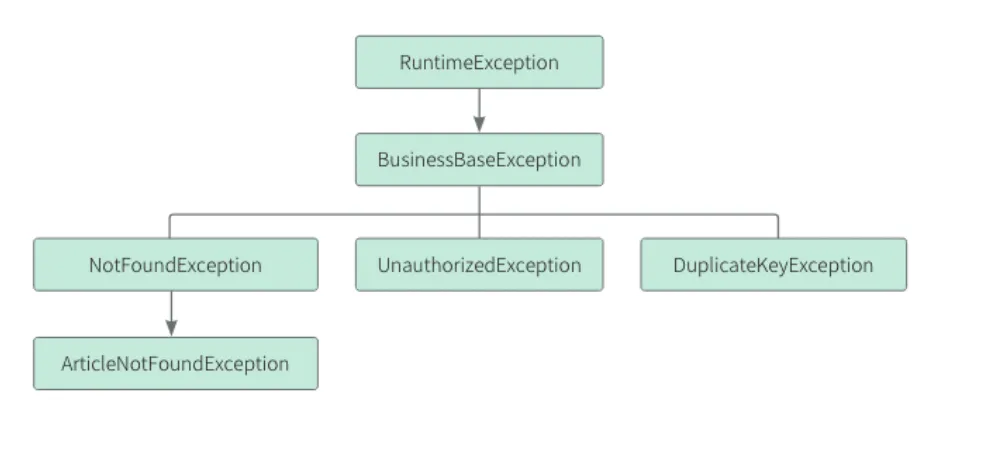
public class BusinessBaseException extends RuntimeException {

    private final ErrorCode errorCode;

    public BusinessBaseException(String message, ErrorCode errorCode) {
        super(message);
        this.errorCode = errorCode;
    }

    public BusinessBaseException(ErrorCode errorCode) {
        super(errorCode.getMessage());
        this.errorCode = errorCode;
    }

    public ErrorCode getErrorCode() {
        return errorCode;
    }
}
입력값 검증이 필요한 상황 3가지 생각해오기
입력값 검증 : 사용자가 요청을 보냈을때 올바른 값인지 유효성검사를 하는 과정
1. 사용자 회원가입 정보 검증
검증 요구사항
- 이메일: 유효한 형식 필수
- 비밀번호: 8~20자, 영문/숫자/특수문자 조합
- 나이: 14세 이상 100세 이하
- 전화번호: 010-XXXX-XXXX 형식
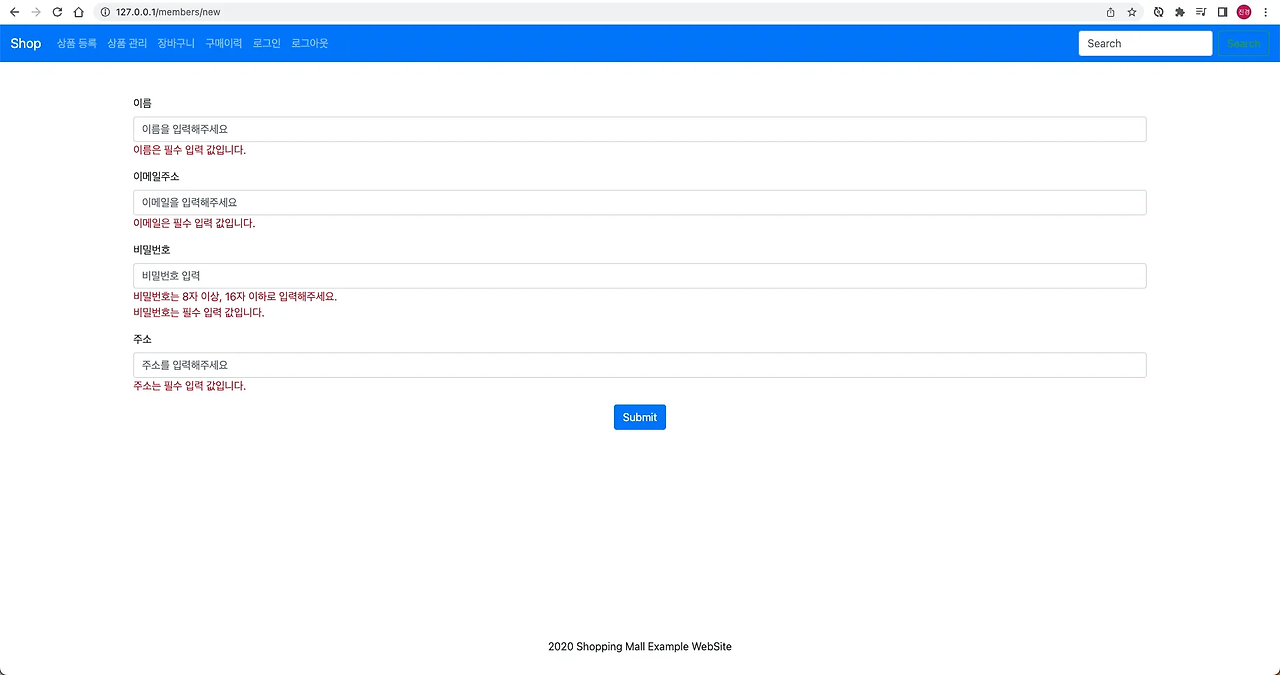
public class SignUpRequest {
    @NotBlank(message = "이메일을 입력해주세요")
    @Email(message = "유효한 이메일 형식이 아닙니다")
    private String email;

    @NotBlank(message = "비밀번호를 입력해주세요")
    @Pattern(regexp = "^(?=.*[A-Za-z])(?=.*\\d)(?=.*[@$!%*#?&])[A-Za-z\\d@$!%*#?&]{8,20}$",
             message = "8~20자 영문/숫자/특수문자 조합 필요")
    private String password;

    @Min(value = 14, message = "14세 이상만 가입 가능합니다")
    @Max(value = 100, message = "유효하지 않은 나이입니다")
    private int age;

    @Pattern(regexp = "^010-\\d{4}-\\d{4}$",
             message = "010-XXXX-XXXX 형식으로 입력해주세요")
    private String phone;
}
@Valid 어노테이션이 DTO의 검증 규칙을 자동 적용
2. 상품 주문 정보 검증
검증 요구사항
- 상품명: 필수 입력 항목 (@NotBlank)
- 가격: 1,000원 ~ 1,000,000원 (@Min, @Max)
- 수량: 1개 ~ 9,999개 (@Min, @Max)
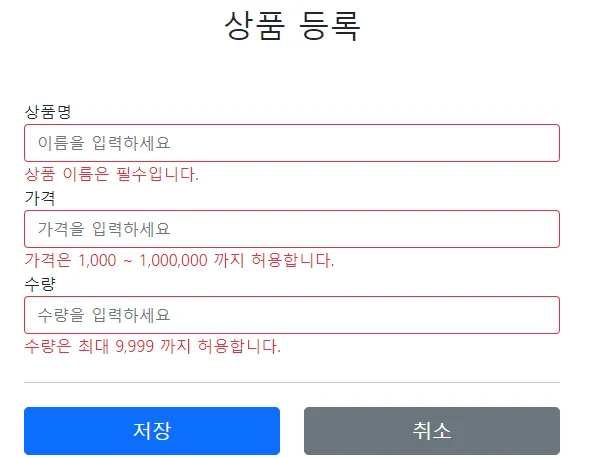
import javax.validation.constraints.*;

@Data // Lombok 사용 (Getter/Setter 자동 생성)
public class ProductOrderRequest {

    @NotBlank(message = "상품명은 필수 입력 항목입니다")
    @Size(max = 100, message = "상품명은 최대 100자까지 입력 가능합니다")
    private String productName;

    @NotNull(message = "가격은 필수 입력 항목입니다")
    @Min(value = 1000, message = "가격은 최소 {value}원 이상이어야 합니다")
    @Max(value = 1000000, message = "가격은 최대 {value}원 이하여야 합니다")
    private Integer price;

    @NotNull(message = "수량은 필수 입력 항목입니다")
    @Min(value = 1, message = "수량은 최소 {value}개 이상이어야 합니다")
    @Max(value = 9999, message = "수량은 최대 {value}개 이하여야 합니다")
    private Integer quantity;
}
3. 파일 업로드 검증
검증 요구사항
- 파일 타입: JPG/PNG/PDF만 허용
- 파일 크기: 최대 5MB
- 파일명: 특수문자 포함 금지
자바 빈 밸리데이션 (Java Bean Validation)
→ 검증 규칙 간편하게 사용 가능
/**
* 문자열을 다룰 때 사용
*/
@NotNull // null 허용하지 않음
@NotEmpty // null, 빈 문자열(공백) 또는 공백만으로 채워진 문자열 허용하지 않음
@NotBlank // null, 빈 문자열(공백) 허용하지 않음
@Size(min=?, max=?) // 최소 길이, 최대 길이 제한
@Null // null만 가능

/**
* 숫자를 다룰 때 사용
*/
@Positive // 양수만 허용
@PositiveOrZero // 양수와 0만 허용
@Negative // 음수만 허용
@NegativeOrZero // 음수와 0만 허용
@Min(?) // 최솟값 제한
@Max(?) // 최댓값 제한

/**
* 정규식 관련
*/
@Email // 이메일 형식만 허용
@Pattern(regexp="?") // 직접 작성한 정규식에 맞는 문자열만 허용
활용 가능
- 회원가입 폼 검증
- API 입력 파라미터 검증
- 데이터베이스 저장 전 검증
- 파일 업로드 메타데이터 검증
💡 새롭게 알게 된 점 & 어려웠던 부분
- 어려웠던 부분:
- 학습 과정에서 깊이 있는 이해와 실습을 충분히 하지 못한 점이 아쉬움.
- Spring의 기초 개념을 더 공부한 후에 다시 정리하면 더 정확한 이해가 가능할 것 같음.
- 개념 이해에만 시간을 투자하다 보니 실습을 진행하지 못했는데, 향후 실습을 통해 경험을 쌓을 예정 - 해결 방법:
- 기초 spring 개념 학습 후 재학습
- 실제 실습 프로젝트에서 사용해보고 싶음
🚀 과제/실습 결과 (있을 시)
public enum ErrorCode {
    USER_NOT_FOUND(404, "USR_001", "사용자를 찾을 수 없습니다");
    // …생성자·getter 생략
}

// 2) 베이스 예외
public abstract class ApplicationException extends RuntimeException {
    private final ErrorCode code; // 에러코드 Enum

    public ApplicationException(ErrorCode code) {
        super(code.getMessage());
        this.code = code;
    }
    public int getStatus() { return code.getStatus(); }
    public String getCode()   { return code.getCode(); }
}

// 3) **커스텀 예외 클래스 (빈칸 채우기)**  => 사용자 찾지 못하는 예외 User_Not_Found 활용
public class UserNotFoundException extends ApplicationException {
    public UserNotFoundException(Long id) {  // id 형식은 Long ->
        super(ErrorCode.USER_NOT_FOUND);
    }
}
👥 스터디 피드백
면접 CS 질문
커스텀 예외를 만들 때 extends RuntimeException을 권장하는 이유는?
DTO 레벨 검증과 서비스 레벨 검증, 어디에 어떤 검증을 두어야 할까?
입력값 검증만으로 방어할 수 없는 공격(예: SQL Injection, XSS)은? 추가로 어떤 조치를 해야 하나?
-> 각각 질문에 대해서 자신만의 답변 생각해보기.